AI Business Process Improvement: A Practical Guide for 2026
Cut costs by 30% and boost productivity by 80%. Learn how AI business process improvement works, which processes to target first, and how to get started.
Chris Miller
6/24/20268 min read


Table of Contents
What Is AI Business Process Improvement?
The 6 Business Areas Where AI Delivers the Most Impact
How to Identify Which Processes to Automate First
A Step-by-Step Implementation Framework
Common Mistakes That Derail AI Rollouts
What ROI Should You Realistically Expect?
FAQ
If your team still spends hours on data entry, chasing approvals, or answering the same customer questions on repeat — you're leaving real money on the table.
AI business process improvement isn't a future promise. It's happening right now, and the numbers are hard to ignore: 88% of organizations already use AI in at least one business function [Deloitte, 2026], and those that go all-in are reporting cost reductions of 15–30% alongside productivity gains that compound over time [Innovadeltech].
This guide cuts through the hype. You'll learn which processes AI can realistically transform, how to prioritize where to start, what common mistakes to avoid, and what ROI you can actually expect.
What Is AI Business Process Improvement?
AI business process improvement is the practice of using artificial intelligence — machine learning, natural language processing, and intelligent automation — to redesign, optimize, or automate workflows that were previously handled manually or with basic software.
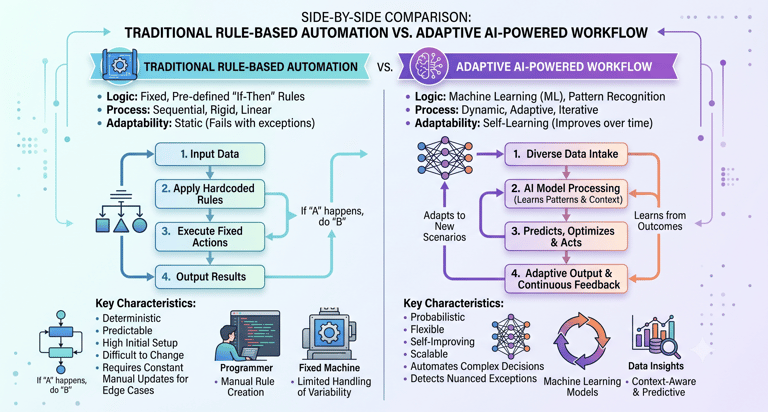
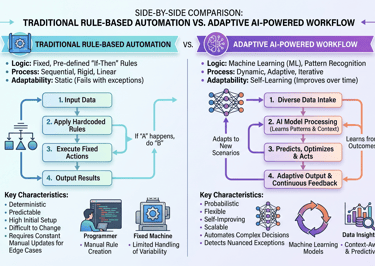
It's different from simple automation. Traditional automation follows fixed rules: if X happens, do Y. AI-powered processes learn from data, adapt over time, and can handle complexity and exceptions that rule-based systems can't touch.
Think of it this way: basic automation is a conveyor belt. AI is a conveyor belt that monitors itself, reroutes when something breaks, and gets faster every week.
The goal isn't to replace your team. It's to redirect them. Most organizations that scale AI successfully report moving 25–40% of employee time from repetitive tasks toward higher-value work [McKinsey, 2025].
The 6 Business Areas Where AI Delivers the Most Impact
Not every process is worth automating. Here are the six areas where AI business process improvement consistently produces measurable results.
1. Customer Service and Support
AI chatbots and virtual agents now handle Tier 1 support around the clock — answering FAQs, processing returns, resetting passwords, and routing complex issues to the right human agent. Companies deploying AI for customer-facing operations see resolution times drop by 40–60% [Master of Code, 2026].
When McKinsey studied Aviva's AI rollout, liability assessment time dropped by weeks and customer complaints fell 65% — with humans still making final decisions [McKinsey].
2. Finance and Accounts Payable
Invoice processing, expense approvals, and compliance reporting are prime candidates for AI. Deutsche Bank's regulatory reporting automation reduced MiFID II compliance costs by €47M annually while improving reporting accuracy by 85% [Master of Code, 2026].
AI-powered claims management in financial services lowers processing time by up to 75% and cuts operational costs by 30–40%.
3. Human Resources and Recruitment
From screening resumes to onboarding new hires, AI compresses timelines dramatically. Modern AI tools can orchestrate offer letters, e-signatures, equipment provisioning, account setup, and training enrollment in a single automated workflow — with conditional branches for role-specific steps [Moxo, 2026].
4. Supply Chain and Inventory Management
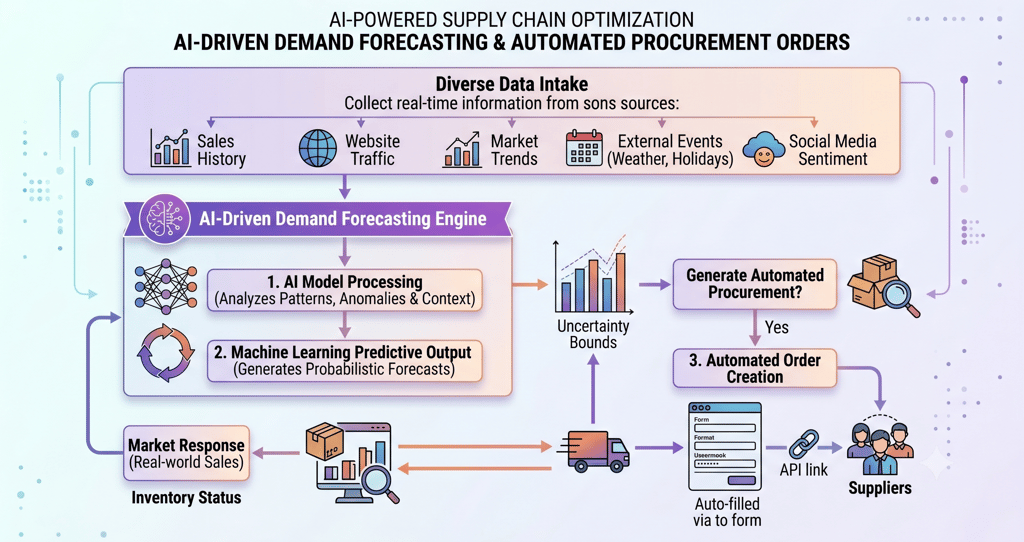
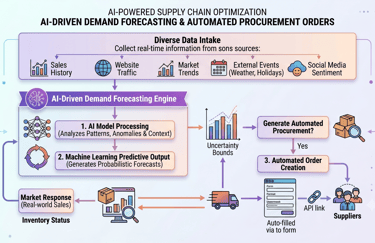
Machine learning models analyze historical sales data, seasonal trends, and supplier lead times to optimize inventory levels in real time. This eliminates both the cost of overstocking and the revenue loss from stockouts — two problems traditional spreadsheet-driven forecasting consistently fails to solve.
5. IT Operations and Help Desk
AI handles IT issue resolution, password resets, software provisioning, and anomaly detection without needing a ticket queue. This frees IT staff for infrastructure, security, and architecture work that actually requires human judgment.
6. Sales and Marketing
Lead qualification, email personalization, campaign optimization, and content production all benefit from AI. Research shows AI delivers 59% faster marketing content production and a 37% improvement in support response times [Vena Solutions, 2025].
How to Identify Which Processes to Automate First
Before you touch a single tool, you need a process audit. The best candidates for AI business process improvement share four characteristics:
1. High volume, low variation. If your team does the same task 50+ times a day, AI can take it over. Data entry, document classification, invoice matching — these are table-stakes wins.
2. Rule-governed with clear inputs and outputs. Processes with defined criteria ("approve if spend < $500 and vendor is pre-approved") are easy to encode. Processes that require nuanced human judgment are better augmented than fully automated.
3. Data-rich history. AI learns from historical data. A process with 18+ months of records gives a model enough signal to perform reliably.
4. High cost of error. Counterintuitively, high-stakes processes are often great AI candidates — because AI is more consistent than humans at repetitive checks. But always keep a human in the loop for final approval.
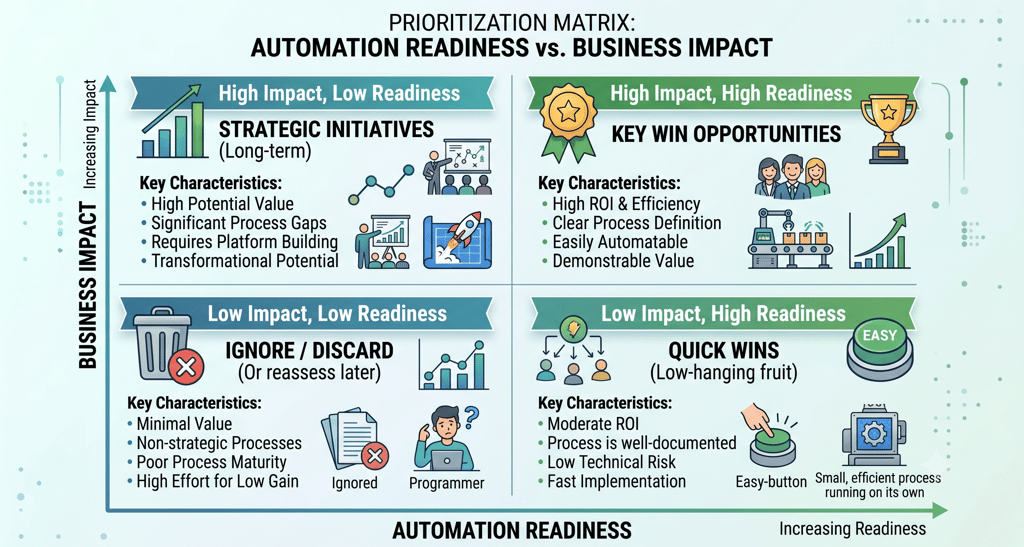
Quick exercise: List every process your team handles more than 10 times per week. Mark each one: high volume? Rule-based? Data-rich? Rank by score — your top three are where to start.
A Step-by-Step Implementation Framework
The organizations that get AI right don't try to automate everything at once. They follow a structured approach.
Step 1: Define the Problem, Not the Technology
Start with a specific, measurable problem. "We want to use AI" is not a strategy. "We want to reduce invoice processing time from 5 days to 1 day" is a target you can build toward.
Step 2: Audit Your Data
AI is only as good as the data it learns from. Before selecting any tool, audit the data tied to your target process:
Is it complete and consistent?
Is it stored in a format that tools can access?
Does it cover enough historical periods to train a model?
Poor data quality is the number one reason AI pilots fail in production.
Step 3: Choose the Right Type of AI
Step 4: Start Small, Prove Value Fast
Pilot one process. Measure before and after. Document the gains. Then scale. Trying to automate five processes simultaneously is how AI projects die from scope creep.
Step 5: Redesign the Workflow — Don't Just Bolt On AI
This is the step most companies skip. You can't take a broken, inefficient process and automate it — you'll just have a faster broken process. Map the current workflow, identify unnecessary steps, then design the AI-assisted version from scratch.
One-third of companies surveyed by Deloitte are now redesigning key processes around AI capabilities, not just adding AI on top of existing ones [Deloitte, 2026]. That's the right instinct.
Step 6: Train Your Team and Monitor Continuously
AI implementations need human oversight, especially early on. Build in:
Regular model performance reviews
Clear escalation paths for edge cases
Ongoing staff training as the tools evolve
Common Mistakes That Derail AI Rollouts
Skipping governance
AI-specific governance roles grew 17% in 2025, yet many companies still lack policies for monitoring AI behavior, reviewing automated decisions, or assigning accountability when systems fail [IBM, 2026]. Before you deploy, define who owns each AI process and what the escalation path looks like.
Underestimating integration complexity
Legacy systems are the silent killer of AI projects. If your ERP and CRM don't talk to each other cleanly, adding AI in the middle adds complexity, not efficiency. Budget for integration work — it's almost always more than the original estimate.
Validating only the best-case scenario
Many teams test AI under ideal conditions and sign off on deployment. Then production arrives with messy, incomplete, or unexpected inputs — and the model breaks. Test edge cases aggressively before you go live.
Treating AI as a one-time project
AI models drift. The patterns they learned six months ago may no longer reflect current reality. Build monitoring, retraining cycles, and a rollback plan into your operational model from day one.
What ROI Should You Realistically Expect?
Let's be honest: ROI from AI depends heavily on the maturity of your implementation and which processes you target.
Here's what the data says:
Early pilots: Expect 15–30% cost reduction and up to 240% ROI over 3–5 years for well-targeted automation [Innovadeltech].
Scaled deployments: Organizations that scale AI across multiple functions report median productivity gains of 33% [McKinsey, 2024].
Full-scale AI adopters: 79% report positive ROI within 18 months [Deloitte, 2026].
High performers: McKinsey's top-tier AI adopters achieve returns exceeding $10.30 per dollar invested — nearly 3x the average.
Agentic AI early adopters are already reporting 15.2% average cost savings and 22.6% productivity improvements [Vena Solutions, 2025]Write your text here...
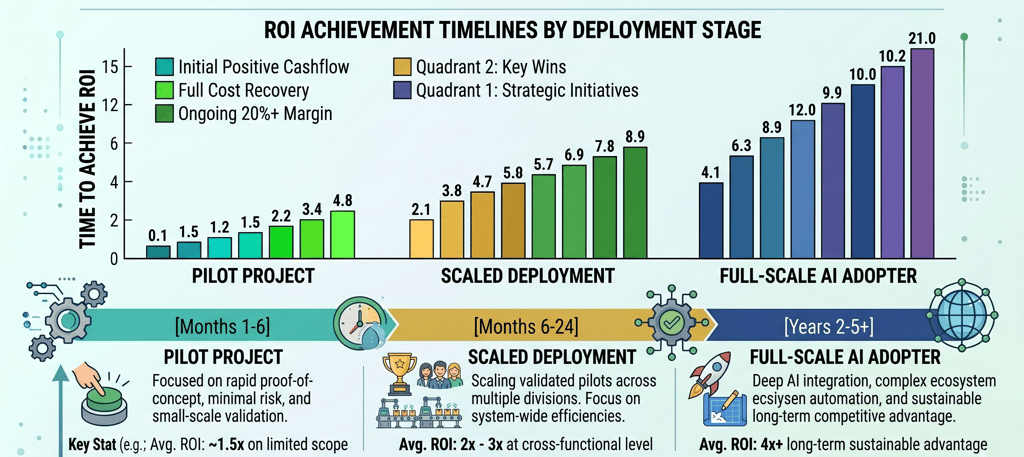
The payback window for most AI automation initiatives is 12–18 months. That's not a decade-long transformation — it's a realistic business cycle. One honest caveat: only 5% of enterprises currently see enterprise-wide returns [Master of Code, 2026]. The gap between the top performers and everyone else comes down to process redesign, data quality, and governance — not the tools themselves.
FAQ:
What business processes can AI improve?
AI delivers the strongest results in high-volume, rule-governed processes with good historical data. The most common starting points are customer service (chatbots, ticketing), finance (invoice processing, expense approvals), HR (recruiting, onboarding), supply chain (demand forecasting, inventory), and IT operations (help desk, anomaly detection). Any process your team does more than 10 times a day is worth evaluating.
How do I start implementing AI in my business without overwhelming my team?
Start with one process. Pick the highest-volume, most repetitive task your team handles, run a 60-day pilot with a clearly defined success metric, and document the results before expanding. The biggest mistake companies make is trying to automate everything at once. Nail one thing, build confidence, then scale.
How long does it take to see ROI from AI process automation?
Most organizations see measurable ROI within 12–18 months of a well-scoped implementation [Deloitte, 2026]. Quick wins in document processing and customer service can show results within 60–90 days. Full-organization transformation takes 2–3 years and requires deliberate process redesign, not just tool deployment.
What are the biggest risks of AI in business processes?
The four most common risks are: poor data quality (garbage in, garbage out), legacy system integration failures, insufficient governance (no one owns the AI when it breaks), and scope creep from trying to do too much too fast. Each is preventable with upfront planning — none are reasons to avoid AI entirely.
Does AI business process improvement require a large budget?
Not necessarily. Many SaaS AI tools start at accessible price points, and cloud-based platforms eliminate the need for expensive on-premise infrastructure. The real cost is internal: staff time for process mapping, data preparation, change management, and training. Budget for those, and the tool costs will look manageable.
AI business process improvement isn't about replacing what works. It's about removing the friction that prevents your team from doing their best work — and redirecting that capacity toward growth.
The businesses winning with AI right now didn't start with a grand transformation plan. They started with one broken, time-consuming process and fixed it. Then another. Then another.
The data is clear: 79% of organizations that fully deploy AI see positive returns within 18 months. The question isn't whether AI can improve your processes. It's which process you're going to fix first.
Start your process audit this week. List the top five tasks your team repeats most often, score them against the four criteria above, and pick your pilot. The best time to start was last year. The second best time is now.
Where does AI fit into your business? - Find Out